AIAITutorial NO. ---
How to use the Gemini 4 Argon API in Python (step-by-step)
From creating an API key to running million-token background jobs, here is how to get started with Google's new flagship model, based on the official documentation, and how to avoid a surprise bill.

Key takeaways
- Gemini 4 Argon is available through the Gemini API under the model ID
gemini-4-argon, on the paid tier only. - You need a Google AI Studio API key, the
google-genaiPython SDK and about ten minutes to send a first request. - Argon thinks by default at "medium." You can set
thinking_levelto low, medium or high, and every thinking token is billed as output. - For very long answers, "long decode" runs in background mode and can return up to about 1 million output tokens; without it, output is capped at 65,536 tokens.
- Prices double on December 1, 2026. Batch jobs cost half, and repeated prompt prefixes get a 95% caching discount, so design for both from day one.
To use the Gemini 4 Argon API, you need a paid-tier Google AI Studio API key, the google-genai Python SDK and the model ID gemini-4-argon. A first request takes about ten minutes; thinking levels, batch jobs and caching then shape the bill.
Before you start: what you need
- A Google account and access to Google AI Studio.
- A Google Cloud project with billing enabled. Google's pricing page lists Argon as "not available" on the free tier, so free-tier keys will not work with this model.
- Python 3 and
pipon your machine. - A rough budget. Even small experiments with a reasoning model can consume more tokens than you expect.
Step 1: Create an API key
Google's API key documentation describes the process in AI Studio:
- Open the API keys page in Google AI Studio.
- If you already have a Google Cloud project, AI Studio does not show it by default. Go to the Dashboard, choose Projects, then Import projects, select your project and import it.
- On the API Keys page, click Create API key. If the button is unavailable, your account lacks the required permissions on that project; ask an administrator for a role such as Project Editor.
- Use the "Add restrictions" option to limit the key to the Gemini API.
Step 2: Store the key safely
The SDK reads the key from an environment variable named GEMINI_API_KEY (or GOOGLE_API_KEY, which takes precedence if both are set). On Linux or macOS with Bash, add this line to ~/.bashrc and reload the shell:
export GEMINI_API_KEY="YOUR_API_KEY_HERE"On macOS with Zsh, use ~/.zshrc instead. On Windows, add a user environment variable with the same name and open a new terminal. Google's security advice is worth following from the start: never commit keys to Git, never embed them in browser or mobile code, use a secret manager in production, and set billing alerts in the Google Cloud console. If a key leaks, Google recommends creating and deploying a replacement first, then disabling the old key and reviewing usage logs.
Step 3: Install the SDK
pip install -U google-genaiGoogle's current quickstart uses the SDK's interactions interface, which is what the examples below follow.
Code samples are adapted from Google's documentation and have not been run by Bullquill; check the current SDK reference.
Step 4: Send your first request
Save the following as first_call.py and run it with python first_call.py:
from google import genai

client = genai.Client()  # reads GEMINI_API_KEY from the environment

interaction = client.interactions.create(
    model="gemini-4-argon",
    input="Summarize the trade-offs between batch and real-time inference in five bullet points.",
)
print(interaction.output_text)
print(interaction.usage)
Printing usage on every call is a good habit while you learn the model. It shows how many input, output and thinking tokens each request consumed, which is the only reliable way to know what a task really costs. For caching, batching and routing tactics that cut spend, see how to reduce LLM API costs.
Step 5: Pick a thinking level
Argon is a reasoning model. According to Google's thinking documentation, it thinks by default at the "medium" level and accepts low, medium or high. You set the level inside generation_config:
interaction = client.interactions.create(
    model="gemini-4-argon",
    input="Extract every date mentioned in this paragraph: ...",
    generation_config={"thinking_level": "low"},
)
Three rules from the documentation save money and frustration:
- Thinking tokens are billed as output, even though the API returns only a summary of the reasoning. The count appears in the usage field for thought tokens.
- Thinking counts toward
max_output_tokens. If you set a low limit, the model can run out of budget mid-thought, cut off the answer, and still charge you for the thinking. - Match the level to the task. Use low for extraction and simple formatting, medium for most coding and agent work, and high for the hardest reasoning.
Step 6: Use long decode for very long outputs
Argon's headline feature is the ability to produce extremely long outputs, such as a full proof or a large code migration. Google's long decode guide says this requires background execution. Without it, any max_output_tokens value above 65,536 returns a 400 error. A minimal pattern looks like this:
import time
from google import genai

client = genai.Client()

job = client.interactions.create(
    model="gemini-4-argon",
    input="Port this module from Python to Rust and explain each change: ...",
    background=True,
    generation_config={"max_output_tokens": 262144, "thinking_level": "high"},
)

while job.status in ("in_progress", "queued"):
    time.sleep(10)
    job = client.interactions.get(id=job.id)

print(job.status)
print(job.usage)
When the status is completed, the documentation says to join the text from every model_output step in job.steps, because a long job produces several. Other details from the guide:
- Background jobs require stored interactions and can run for up to 24 hours.
- If you stream, set HTTP read timeouts of 15 to 20 minutes. After about 64,000 tokens, output arrives in larger chunks, so long pauses are normal.
- Google suggests 262,144 as a starting value for complex reasoning, and warns against low limits such as 8,192.
- The model does not follow word or token targets, so do not ask for "exactly 50,000 words."
- Long decode is a poor fit for chat, summarization, extraction and latency-sensitive work.
| Job status | What it means | What to do |
|---|---|---|
completed | Finished | Join all model_output steps |
requires_action | The model called a tool | Run the tool and send back the result |
incomplete | Ran out of output budget | Raise max_output_tokens or lower thinking_level |
failed | Error during the run | Retry; contact support if it repeats |
cancelled | Stopped early | Check usage: completed work is still billed |
Source: Google AI for Developers, long decode guide.
Step 7: Send non-urgent work as a batch
If results can wait, the Batch API halves the price. Google targets a 24-hour turnaround, though many jobs finish sooner. Inline batches suit requests under 20 MB in total; larger jobs use a JSONL file of up to 2 GB. Google's Batch API documentation says results remain available for six weeks. Google's batch example uses a Flash model, but Argon's model page lists Batch as supported:
batch = client.batches.create(
    model="gemini-4-argon",
    src=[
        {"contents": [{"role": "user", "parts": [{"text": "Classify this support ticket: ..."}]}]},
        {"contents": [{"role": "user", "parts": [{"text": "Classify this support ticket: ..."}]}]},
    ],
    config={"display_name": "ticket-triage-test"},
)
print(batch.name)
Poll with client.batches.get(name=batch.name) until the state is JOB_STATE_SUCCEEDED, then read the inline responses from the job's destination field.
Step 8: Keep costs under control
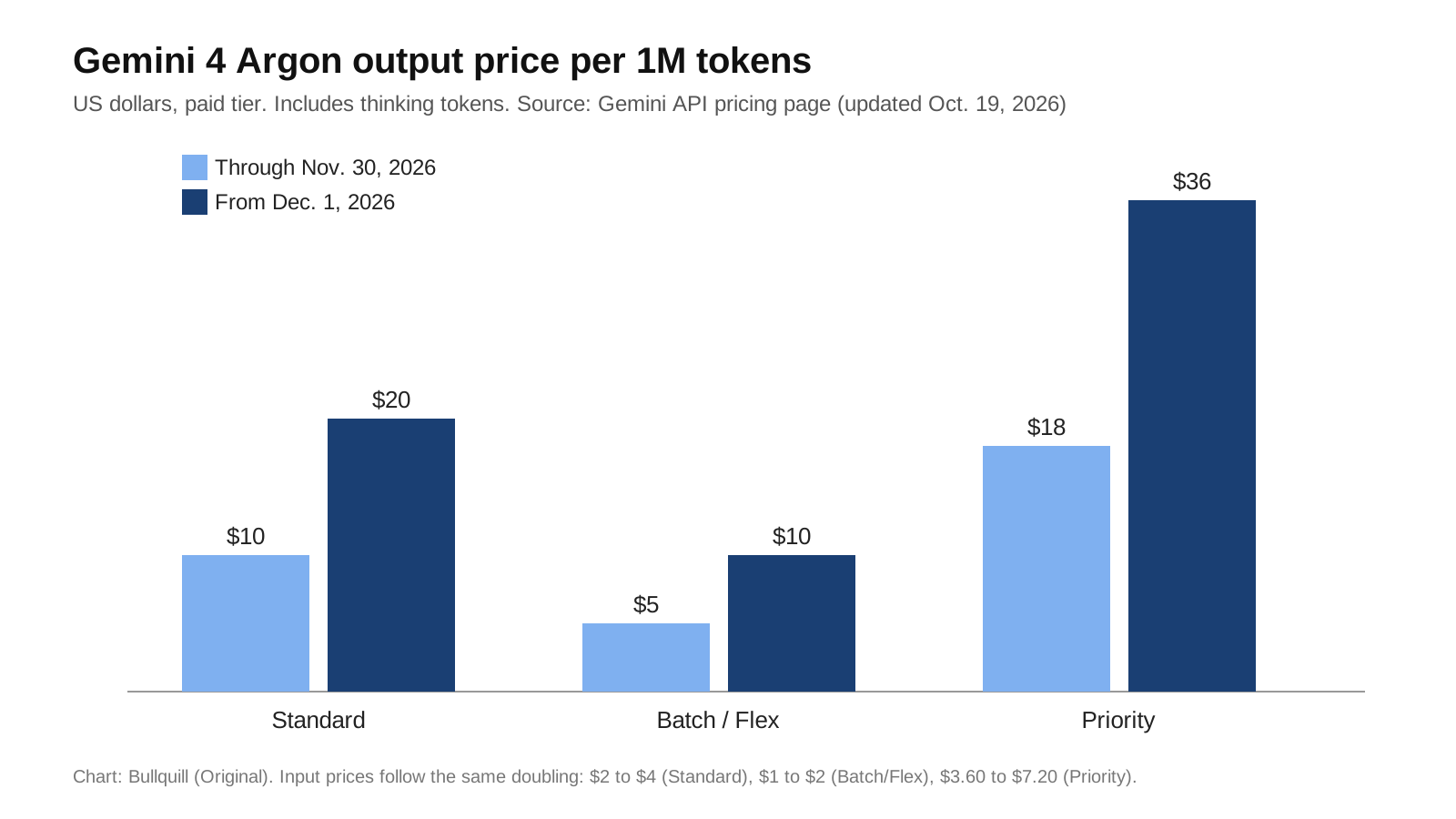
| Argon tier (per 1M tokens) | Input, to Nov. 30 | Input, from Dec. 1 | Output, to Nov. 30 | Output, from Dec. 1 |
|---|---|---|---|---|
| Standard | $2.00 | $4.00 | $10.00 | $20.00 |
| Batch / Flex | $1.00 | $2.00 | $5.00 | $10.00 |
| Priority | $3.60 | $7.20 | $18.00 | $36.00 |
| Cached input (Standard) | $0.10 | $0.20 | n/a | n/a |
Source: Gemini API pricing page, last updated Oct. 19, 2026. Output prices include thinking tokens.
- Exploit implicit caching. Argon supports only implicit caching, which discounts repeated input by 95%. Put long, stable content such as system instructions and reference documents at the start of the prompt, and the variable part at the end.
- Budget at December prices. If a workload only makes sense at $2 and $10, it will not make sense in six weeks.
- Measure before scaling. Run 20 to 50 representative requests, log usage, and calculate cost per task including thinking tokens.
- Use the right tier. Batch or Flex for overnight jobs; Standard for interactive use; Priority only when latency matters.
- Mind search grounding. Google lists 5,000 free grounded search requests per month on Argon, then $14 per 1,000.
Common mistakes to avoid
- Using a free-tier key. Argon calls will fail until billing is enabled on the project behind the key.
- Setting a tiny output limit. Because thinking shares the output budget, a limit such as 2,000 tokens can leave nothing for the answer on a hard prompt.
- Turning on long decode for everything. It is built for proofs and large code tasks. For chat or summaries, a normal request is faster and cheaper.
- Ignoring cancelled jobs. Google bills the work completed before a background job is cancelled or fails, so check
usageeven when you abandon a run. - Counting total input tokens across hops as context size. Google warns that the summed input figure overstates how much context a long job is using.
Where to go next
Once your first calls work, the same habits carry over to bigger projects. Better instructions often cut thinking tokens more than any setting, so our guide to prompt engineering techniques is a good next read. If you want the model to call your own functions, follow our tutorial on building an AI agent with tool calling in Python, and to ground answers in your own documents, see how to build a RAG app in Python. For a comparison point on the OpenAI side, read our report on the general availability of OpenAI's Decisions API.
What it means for you
For individual developers, the introductory price makes this the cheapest moment to evaluate a frontier model on real work. For teams, the bigger lesson is that reasoning models change cost modeling: the visible answer is only part of the bill, and settings such as thinking level and output limits matter as much as the per-token price. Build your logging and limits before your first production deployment, not after your first invoice.
Frequently asked questions
Can I use Gemini 4 Argon on the free tier?
No. Google's pricing page lists Gemini 4 Argon as not available on the free tier. You need a project with billing enabled to call gemini-4-argon through the API.
What is the model ID for Gemini 4 Argon?
The stable model ID is gemini-4-argon, according to Google's developer documentation.
How do I change Gemini 4 Argon's thinking level?
Set thinking_level inside generation_config to low, medium or high. The default is medium. Thinking tokens are billed as output and count toward max_output_tokens.
How do I get outputs longer than 65,536 tokens?
Use long decode: send the request with background=True and a higher max_output_tokens, then poll the interaction until it completes. Without background mode, values above 65,536 return a 400 error.
How can I reduce Gemini 4 Argon costs?
Use the Batch or Flex tiers for non-urgent work at half price, keep a stable prompt prefix to benefit from the 95% implicit caching discount, choose lower thinking levels for simple tasks, and budget at the higher prices that apply from December 1, 2026.
Sources
- Google AI for Developers: Gemini 4 Argon model page
- Google AI for Developers: Gemini API quickstart
- Google AI for Developers: Using Gemini API keys
- Google AI for Developers: Thinking
- Google AI for Developers: Long decode
- Google AI for Developers: Batch API
- Google AI for Developers: Gemini API pricing
- Google: Gemini 4 Argon is now available in the Gemini app


